When your project involves a large number of access control permission assignments, simple physical tags are no longer sufficient. Here are three core steps to achieve efficient digital management:
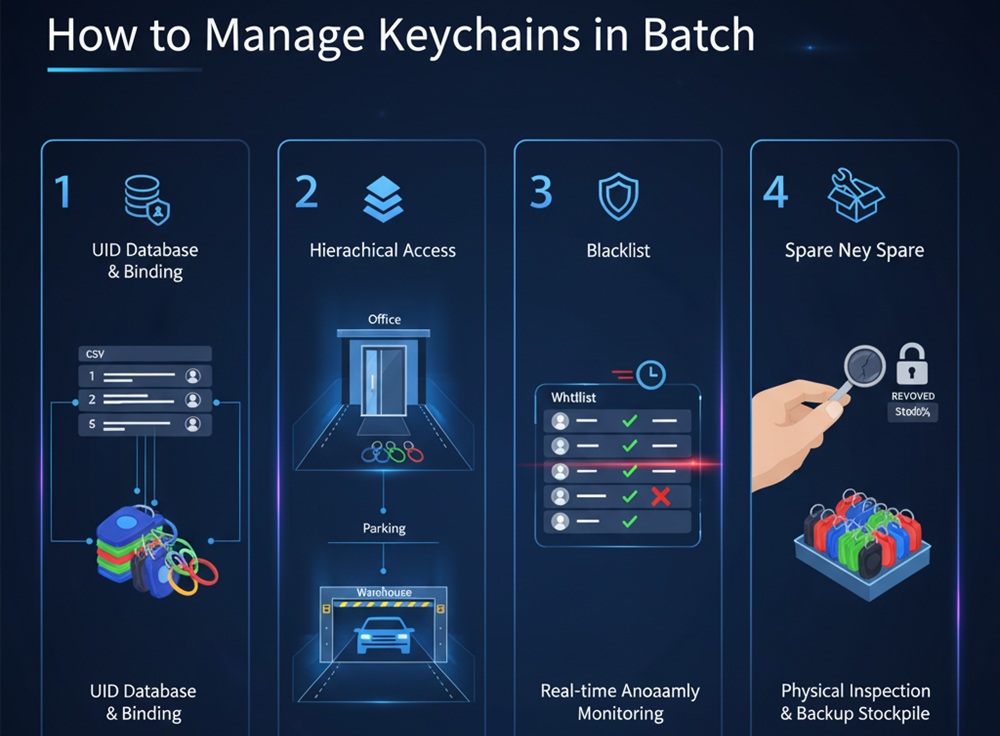
1.UID Database and Binding (UID Mapping)
Each NFC keychain has a globally unique UID (Unique Identifier) at the factory.
- Recommendation: When purchasing, request the supplier to provide a CSV data list of the corresponding keychain UIDs.
- Implementation: Import this UID list directly into your access control management software backend and associate each UID with the corresponding user (or employee ID). This way, you can complete the authorization directly in the system without the need for cumbersome on-site keychain writing operations.
2.Hierarchical Access
Do not assign the same permissions to all keychains.
- Strategy: Utilize the multi-sector functionality of NFC chips.
- Implementation: Divide different permission levels for different areas (e.g., offices, parking lots, warehouses). In the management backend, you can batch authorize or suspend access based on keychain “groups” without processing each keychain individually.
3.Real-time Anomaly Monitoring and Revocation Mechanism
Keychain loss is the biggest security risk for access control systems.
- Recommendation: A real-time linkage mechanism between “whitelists” and “blacklists” must be established.
- Implementation: When an employee reports a lost keychain, the management backend should be able to revoke it within seconds. Once the UID is on the blacklist, even if someone else finds the keychain, the access controller will refuse access.
4.Regular Physical Inspection and Backup Stockpile
- Inspection: Although NFC keychains are robust, after several years of use, metal fatigue may occur at the keychain connection point. It is recommended to conduct a physical inventory check annually.
- Backup Plan: Always maintain 5%-10% of “pre-authorized” keychains in the system as an emergency backup inventory to ensure plug-and-play functionality for new employees or in case of accidental loss, without waiting for temporary procurement.
💡 Recommended Professional Management Tools:
Data Encoding Equipment: If you need to customize the data stored inside the key fob, we recommend purchasing a desktop NFC reader/writer (such as the HY-R1900-U). Combined with batch encoding software, this enables a streamlined process of “scanning a code, writing a card”.
Software Integration: Ensure your access control controller supports API interface integration. This allows the access control system to be linked with the Human Resources (HR) system, achieving fully automated management where “employees automatically gain access upon joining and automatically have their access revoked upon leaving”.
For more information,please contact us.